
SAP Concur: The Complete Enterprise Guide to Travel, Expense & Invoice Management
Table of Contents
- • 1. What is SAP Concur?
- ↳ A Brief History
- • 2. The Three Core Pillars of SAP Concur
- ↳ Pillar 1: Concur Travel
- ↳ Pillar 2: Concur Expense
- ↳ Pillar 3: Concur Invoice
- • 3. Real-World Business Scenario: The End-to-End Expense Lifecycle
- ↳ Step 1: Pre-Trip Approval (Concur Request)
- ↳ Step 2: Policy-Compliant Booking
- ↳ Step 3: On-the-Go Expense Capture
- ↳ Step 4: Submission & Compliance Check
- ↳ Step 5: Approval & Audit Routing
- ↳ Step 6: Direct Financial Posting in SAP S/4HANA
- • 4. How SAP Concur Integrates with SAP S/4HANA & ECC
- ↳ Integration Architecture Overview
- ↳ 1. Master Data Synchronization (ERP -> Concur)
- ↳ 2. Transactional Financial Posting (Concur -> ERP)
- • 5. Top Business Benefits of Deploying SAP Concur
- • 6. Enterprise Competitor Comparison: Concur vs. Expensify vs. Coupa vs. Navan
- • 7. Common Implementation Pitfalls & How to Avoid Them
- ↳ Pitfall 1: Over-Complicating Expense Policy Rules
- ↳ Pitfall 2: Neglecting Mobile App Onboarding
- ↳ Pitfall 3: Cost Center Mapping Mismatches
- • 8. Frequently Asked Questions (FAQ)
- ↳ What is the difference between SAP ERP and SAP Concur?
- ↳ Can SAP Concur work with non-SAP ERP systems?
- ↳ How does Concur Expense handle multiple currencies?
- ↳ Is SAP Concur secure and compliant for tax audits?
- • Summary & Next Steps
- ↳ Key Takeaways Checklist
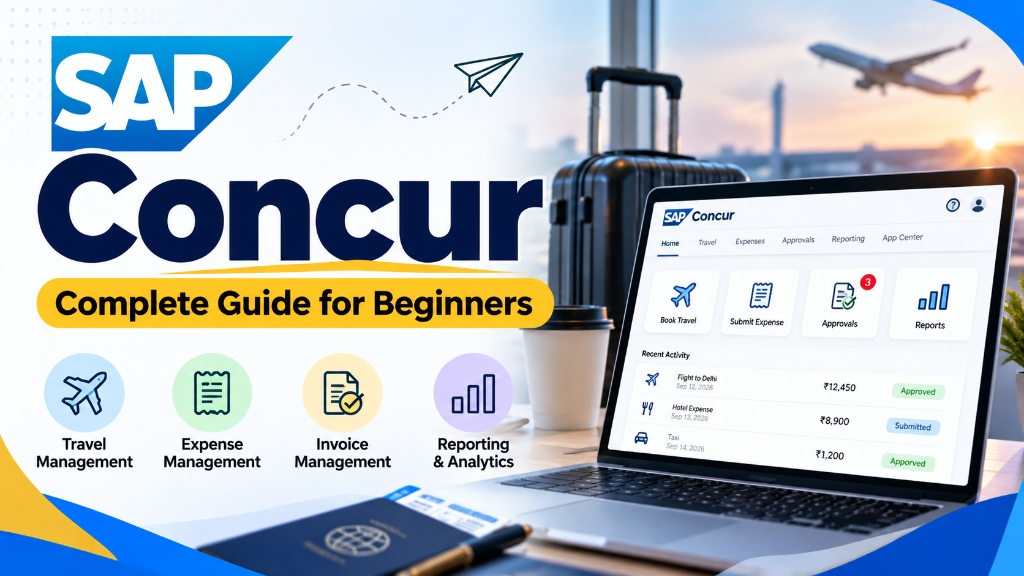 Figure 1: SAP Concur brings travel booking, mobile receipt scanning, invoice processing, and corporate expense analytics into a unified cloud interface.
Managing business travel, employee reimbursements, and supplier invoices manually is one of the most frustrating bottlenecks in corporate finance.
Employees dread saving crumpled paper receipts and filling out complex spreadsheets after a multi-day client trip. Managers hate chasing down missing tax invoices to approve reimbursement claims. And accounting teams spend hundreds of hours manually verifying vendor VAT numbers, matching corporate credit card statements, and typing journal entries into SAP accounting software.
This is precisely why SAP Concur exists.
As the global market leader in Travel and Expense (T&E) management, SAP Concur processes hundreds of millions of business expense reports annually. In this guide, we break down what SAP Concur is, how its core products work, its direct integration with SAP S/4HANA Finance, real-world business scenarios, and actionable implementation best practices.
Before we dive in, feel free to check out our What is SAP overview or look up standard financial transaction codes in our T-Code Lookup Tool.
1. What is SAP Concur?
SAP Concur is a software-as-a-service (SaaS) cloud platform that automates and connects three critical business spending areas:
- Corporate Travel Booking (Flights, hotels, rail, and car rentals within company policy)
- Employee Expense Management (Mobile receipt capture, credit card reconciliation, and employee reimbursement)
- Accounts Payable Invoice Processing (Supplier invoice capture, purchase order matching, and automated approvals)
┌─────────────────────────────────────────────────────────────┐
│                    SAP CONCUR PLATFORM                      │
│                                                             │
│   ┌──────────────┐     ┌──────────────┐     ┌───────────┐   │
│   │    TRAVEL    │     │   EXPENSE    │     │  INVOICE  │   │
│   │ Policy, GDS, │ ──> │ OCR, Cards,  │ ──> │ Matching, │   │
│   │ Duty of Care │     │ Per Diem, GL │     │ Approvals │   │
│   └──────────────┘     └──────────────┘     └───────────┘   │
└──────────────────────────────┬──────────────────────────────┘
                               │ Automated Financial Posting
┌──────────────────────────────▼──────────────────────────────┐
│       Core ERP Ledger (SAP S/4HANA / ECC / Oracle / NetSuite)│
└─────────────────────────────────────────────────────────────┘
A Brief History
Founded in 1993 by Steve Singh, Rajeev Singh, and Mike Hilton as Concur Technologies, the company started by selling boxed floppy-disk expense software. Over two decades, Concur transitioned entirely to the cloud, pioneered corporate card electronic data feeds, and acquired key travel platforms like TripIt.
In 2014, SAP acquired Concur for approximately $8.3 billion, making it a cornerstone of SAP’s intelligent spend management portfolio alongside SAP Ariba (procurement) and SAP Fieldglass (contingent labor).
2. The Three Core Pillars of SAP Concur
SAP Concur is organized into three primary modular solutions that can be deployed independently or combined into a unified workflow.
                         SAP CONCUR SUITE
     ┌───────────────────┬───────────────────┬───────────────────┐
     │   Concur Travel   │  Concur Expense   │  Concur Invoice   │
     ├───────────────────┼───────────────────┼───────────────────┤
     │ • Air, Hotel, Rail│ • Mobile Receipt  │ • OCR Paper &     │
     │ • GDS Integration │   Scanning (OCR)  │   PDF Invoices    │
     │ • Negotiated Rates│ • Credit Card Feeds│ • 2-Way & 3-Way PO│
     │ • Policy Warnings │ • Per Diem Rules  │   Matching        │
     │ • Duty of Care    │ • Mileage Tracking│ • Vendor Payment  │
     │   (Locate/Alerts) │ • Audit Rules     │   Execution       │
     └───────────────────┴───────────────────┴───────────────────┘
Pillar 1: Concur Travel
Concur Travel is a self-service corporate booking tool designed to keep employees inside company travel policy while booking business trips.
Instead of employees visiting public booking sites like Expedia or airline websites—where corporate discounts cannot be tracked—they book directly within Concur Travel.
 Figure 2: Business travelers scan receipts on the go while managers review automated expense line items and policy compliance.
Key Capabilities:
- Global Distribution System (GDS) & Direct Connect: Integrates directly with Amadeus, Sabre, and Travelport, as well as low-cost carriers (LCCs) and rail networks (Amtrak, Eurostar, Deutsche Bahn).
- Corporate Policy Controls: The system flags out-of-policy flights (e.g., booking Business Class on a 2-hour flight or exceeding hotel rate caps) and requires managerial pre-approval before ticketing.
- Negotiated Corporate Rates: Automatically applies pre-negotiated corporate discounts with preferred hotel chains, airlines, and car rental agencies.
- Duty of Care (Concur Locate): In emergencies (natural disasters, political unrest, or flight cancellations), corporate security teams can pinpoint where traveling employees are located in real time and send safety alerts.
Pillar 2: Concur Expense
Concur Expense is the core module used by day-to-day employees to compile, submit, and reconcile business expenditures.
Key Capabilities:
- ExpenseIt (Optical Character Recognition - OCR): Employees snap a photo of a physical receipt with the Concur mobile app. Machine learning instantly extracts the vendor name, date, total amount, currency, and tax breakdown, creating an expense line item automatically.
- Direct Corporate Card Feeds: Connects directly with commercial card issuers (American Express, Visa, Mastercard, Citibank). When an employee swipes their corporate credit card, the transaction flows electronically into Concur within 24–48 hours and automatically matches with the scanned receipt image.
- Per Diem & Mileage Tracking: Automatically calculates government-mandated travel allowances (such as IRS Per Diem Rates in the US or statutory meal rates in Germany) based on location, departure time, and meals provided by hotels. Integrated GPS calculates exact driving mileage.
- Itemization & Tax Reclaim: Enables employees to split a complex hotel bill into room rate, local occupancy tax, room service, and personal expenses, ensuring accurate VAT/GST reclaim for accounting teams.
Pillar 3: Concur Invoice
Concur Invoice brings accounts payable (AP) automation to non-payroll vendor expenses, such as utility bills, consulting retainers, office supplies, and software subscriptions.
Key Capabilities:
- Automated Invoice Ingestion: Suppliers email PDF invoices directly to a dedicated company Concur inbox, where OCR extracts invoice headers and line items.
- Two-Way and Three-Way Matching: Automatically compares the invoice against the Purchase Order (PO) and Goods Receipt (GR) recorded in your ERP.
- Pre-Ledger Approval Routing: Routes invoices to department heads based on cost center hierarchies before any payment leaves company bank accounts.
3. Real-World Business Scenario: The End-to-End Expense Lifecycle
To understand how SAP Concur operates across departments, let’s follow an enterprise sales executive (Rahul) traveling from Mumbai to London for a 4-day client contract negotiation.
[ Step 1: Pre-Trip Request ]
       │  (Rahul submits estimated flight & hotel budget; Manager approves)
       ▼
[ Step 2: In-Policy Booking ]
       │  (Booked via Concur Travel using company corporate airline discount)
       ▼
[ Step 3: Trip Execution & Expense Capture ]
       │  (Snaps dinner receipts with ExpenseIt; Corporate Card feeds sync)
       ▼
[ Step 4: Expense Report Submission ]
       │  (System validates per diem, flags zero policy violations)
       ▼
[ Step 5: Manager & Audit Approval ]
       │  (Manager reviews online; Audit rule checks tax itemization)
       ▼
[ Step 6: Automated ERP Posting ]
          (Concur sends JSON payload to S/4HANA: Debit Expense, Credit Payables)
Step 1: Pre-Trip Approval (Concur Request)
Before booking international travel, Rahul creates a pre-travel request in Concur outlining the business purpose, estimated airfare ($1,200), and 4 nights of hotel accommodation ($1,000). The request automatically routes to his Vice President for approval.
Step 2: Policy-Compliant Booking
Once approved, Rahul uses Concur Travel. The system highlights preferred airline carriers with company discounts. Because his flight is under 8 hours, the system enforces economy class according to corporate policy.
Step 3: On-the-Go Expense Capture
During the trip:
- Rahul pays for a business dinner with the client using his corporate card.
- He opens the Concur mobile app and photographs the paper restaurant receipt.
- ExpenseIt OCR identifies the transaction:
$185.50 at Dishoom London on Oct 12. - Two days later, the banking feed from American Express arrives in Concur. The platform detects identical dates, amounts, and vendor names, seamlessly merging the credit card charge with the scanned receipt image into a single reconciled item.
Step 4: Submission & Compliance Check
Upon returning, Rahul clicks “Create Expense Report”. Concur calculates his daily UK meals allowance (per diem) while deducting the business dinner already covered. Built-in audit rules verify that every expense over $25 has an attached receipt image.
Step 5: Approval & Audit Routing
Rahul submits the report. His direct manager approves it with one tap on a mobile device. The corporate compliance team’s automated audit profile verifies tax rates and clears the report without manual paperwork.
Step 6: Direct Financial Posting in SAP S/4HANA
The Concur Financial Integration Service transmits the approved data payload directly into the company’s SAP S/4HANA Cloud system:
- Debit: Travel & Entertainment Expense Account (
GL 652000) assigned to Rahul’s Cost Center (CC_SALES_MUM). - Credit: Corporate Card Liability / Employee Accounts Payable Account (
FI-AP). - The employee reimbursement is scheduled in the next automated payment run (
F110), and the company’s general ledger updates in real time.
4. How SAP Concur Integrates with SAP S/4HANA & ECC
A common misconception is that SAP Concur is simply part of the standard on-premise SAP GUI. In reality, SAP Concur is a standalone multi-tenant cloud platform. It communicates with your backend ERP through structured integration connectors.
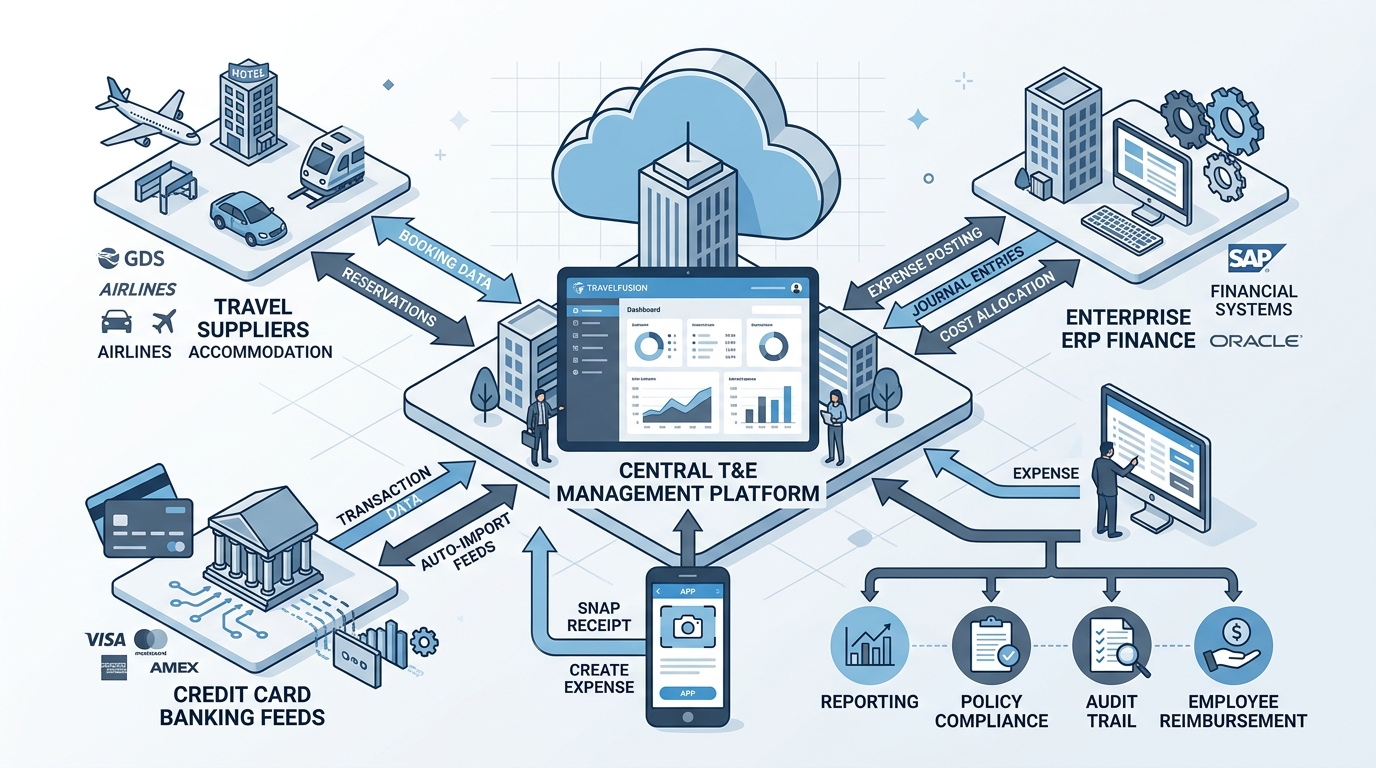 Figure 3: High-level architectural data exchange between SAP Concur Cloud, banking feeds, travel suppliers, and SAP S/4HANA Finance.
Integration Architecture Overview
┌─────────────────────────────────────────────────────────────┐
│                    SAP Concur Cloud Core                    │
│       (Users, Expense Reports, Invoices, Receipts)          │
└──────────────┬──────────────────────────────┬───────────────┘
               │                              │
     Master Data Sync (Inbound)      Financial Posting (Outbound)
     • Cost Centers                  • Approved Expense Documents
     • Internal Orders / WBS         • Vendor Invoices (AP)
     • GL Accounts                   • Payment Confirmations
     • Employee Bank Details         • Tax & VAT Line Postings
               │                              │
               ▼                              ▼
┌─────────────────────────────────────────────────────────────┐
│              SAP S/4HANA Finance / SAP ECC 6.0              │
│       Universal Journal (ACDOCA) & Payment Runs (F110)      │
└─────────────────────────────────────────────────────────────┘
1. Master Data Synchronization (ERP -> Concur)
To ensure employees charge expenses to valid accounts, the integration synchronizes key financial master data from SAP S/4HANA into Concur on a scheduled daily basis:
- Cost Centers (
CSKS) & Profit Centers (CEPC) - Work Breakdown Structure (WBS) Elements for capital project accounting
- General Ledger Accounts (
SKA1/SKB1) - Company Codes and Tax Codes
- Vendor Master / Business Partner (
BUT000) records
2. Transactional Financial Posting (Concur -> ERP)
Once an expense report or vendor invoice passes all approvals in Concur, it enters the Financial Integration Service (FIS) queue:
- Concur packages the financial document as an encrypted payload and calls SAP standard integration APIs via SAP BTP Integration Suite or the native SAP Concur Integration-AddOn.
- The ERP validates cost center assignments, checks budget availability, and creates a financial accounting document (
BKPF/ACDOCA). - Once paid via the ERP payment program (
F110), the ERP sends a Payment Notification Status back to Concur, updating the report status to “Paid” so the employee knows funds were transferred.
5. Top Business Benefits of Deploying SAP Concur
Organizations implementing automated spend management typically experience significant operational and financial returns:
| Operational Area | Traditional Manual Process | With SAP Concur Automation |
|---|---|---|
| Expense Report Creation | 45–60 minutes per report spent typing spreadsheet rows and gluing paper receipts. | Under 10 minutes using mobile receipt OCR and auto-matched card feeds. |
| Processing Cost Per Report | $50 to $60 in administrative labor, review time, and manual data entry. | Reduced to under $18 per report through automated audit rules. |
| Policy Compliance Rate | ~60–70%; out-of-policy spending is caught weeks after money is already spent. | Over 95%; violations are flagged and blocked at the exact moment of booking or entry. |
| Financial Visibility | 20–30 day lag; corporate card spending is invisible until monthly statements arrive. | Near real-time visibility into committed spend before credit card statements close. |
| VAT/GST Reclaim Recovery | Millions in foreign VAT lost due to missing or non-compliant receipts. | Maximized recovery with automated tax-compliant digital receipt archives. |
6. Enterprise Competitor Comparison: Concur vs. Expensify vs. Coupa vs. Navan
How does SAP Concur stack up against other popular travel and expense platforms?
| Feature / Dimension | SAP Concur | Navan (TripActions) | Expensify | Coupa Expense |
|---|---|---|---|---|
| Primary Target Market | Mid-market to Fortune 500 Global Enterprises | Startups to Upper Mid-Market | Small Businesses & Startups | Mid-market to Large Enterprises |
| ERP Integration Depth | Deepest native integration with SAP S/4HANA & ECC | Strong (via modern REST APIs) | Basic / Flat-file focused | Deep integration across procurement |
| Global Localization | 150+ currencies, complex multi-country statutory tax rules | Growing global footprint | Primarily US / UK focused | Strong international compliance |
| Integrated Travel Desk | Native GDS, extensive direct airline/hotel connections | Strong modern travel app | Requires third-party travel partners | Integrated travel partner network |
| Audit & Fraud Detection | Comprehensive rule engine + AI anomaly detection | Policy enforcement rules | SmartScan receipt audit | Advanced risk engine across AP spend |
7. Common Implementation Pitfalls & How to Avoid Them
Rolling out SAP Concur across thousands of global employees requires careful planning. Here are the three most frequent mistakes companies make and how to avoid them:
Pitfall 1: Over-Complicating Expense Policy Rules
Many finance teams try to digitize legacy 80-page policy manuals containing dozens of conditional approval levels.
- The Solution: Keep submission rules simple and streamlined. Configure hard stops only for critical legal and fiscal compliance rules (such as mandatory tax receipts over $25 or alcohol itemization), and use automated threshold warnings for secondary items.
Pitfall 2: Neglecting Mobile App Onboarding
If traveling employees do not download and use the mobile app, they will continue saving stacks of physical receipts until the end of the month, recreating the exact same data bottlenecks.
- The Solution: Conduct hands-on mobile onboarding sessions. Train employees on ExpenseIt receipt snapping during routine department meetings.
Pitfall 3: Cost Center Mapping Mismatches
When an employee changes departments or projects, their profile in Concur might point to an obsolete cost center, causing financial posting errors (FICO posting rejections) in SAP S/4HANA.
- The Solution: Implement automated daily employee master data synchronization from your HR system (such as SAP SuccessFactors or Workday) to keep reporting hierarchies synchronized.
8. Frequently Asked Questions (FAQ)
What is the difference between SAP ERP and SAP Concur?
SAP ERP (such as SAP S/4HANA or ECC) is the central on-premise or cloud system of record that handles global general ledgers, inventory, production, and manufacturing. SAP Concur is a specialized SaaS cloud application focused on employee travel booking, mobile receipt expense reporting, and supplier invoice automation that feeds financial postings into the core SAP ERP.
Can SAP Concur work with non-SAP ERP systems?
Yes. While Concur has optimized connectors for SAP S/4HANA and SAP ECC, it integrates with non-SAP ERP systems including Oracle Cloud ERP, NetSuite, Microsoft Dynamics 365, QuickBooks, and Workday via standard REST APIs, SFTP batch file transfers, and intermediate middleware.
How does Concur Expense handle multiple currencies?
Concur automatically converts foreign expenses into your company’s home currency using real-time foreign exchange rates (from sources like OANDA or the European Central Bank) based on the exact transaction date. If a corporate card transaction feeds in, it uses the exact exchange rate billed by the credit card network.
Is SAP Concur secure and compliant for tax audits?
Yes. SAP Concur complies with major international security standards including ISO 27001, SOC 1 / SOC 2 Type II, and GDPR. Its digital receipt repository provides timestamped, audit-proof archives that satisfy statutory tax authorities including the IRS (United States), HMRC (United Kingdom), and GST authorities across the Asia-Pacific region.
Summary & Next Steps
SAP Concur transforms corporate spend from a disconnected, receipt-heavy administrative chore into an automated, transparent, and policy-compliant workflow. By connecting travel booking, receipt OCR scanning, and corporate credit cards directly to backend financial ledgers, enterprises gain total control over employee spend while saving thousands of administrative hours each year.
- Want to explore core SAP finance modules? Read our complete guide on SAP FICO Module Overview & Careers.
- Curious about how modern SAP platforms connect? Check out our deep dive on SAP Business Technology Platform (BTP).
- Looking for transaction shortcuts? Access our free Interactive SAP T-Code Search Directory.
Key Takeaways Checklist
- SAP Concur is a cloud SaaS platform covering Travel booking, Expense reporting, and Invoice management.
- ExpenseIt OCR turns mobile receipt photos into categorized expense entries within seconds.
- Corporate Card Integration automatically merges banking transactions with digital receipts to eliminate duplicate data entry.
- ERP Integration synchronizes cost centers from SAP S/4HANA and posts approved expense vouchers directly into the Universal Journal (
ACDOCA). - Duty of Care (Concur Locate) provides real-time location monitoring for traveling employees during emergencies.

Written by Daksh Dedha
SAP Technical ConsultantDaksh is an SAP Technical Consultant specializing in ABAP programming, SAP S/4HANA migrations, Fiori development, and BTP cloud architecture. He authors free, hands-on tutorials to make enterprise SAP education accessible to all developers.
Test Your Knowledge
Loading question...
Quiz Completed
Related Tutorials
SAP Accounting Software: The Ultimate Guide to SAP S/4HANA Finance & FICO
Discover how SAP accounting software powers global enterprise finance. Explore SAP FICO modules, Universal Journal (ACDOCA), S/4HANA Finance migration, and real-time ledger accounting.
SAP FundamentalsWhat is SAP? The Ultimate Enterprise Guide to SAP ERP, Architecture & Modules
A technical and beginner-friendly deep dive into what SAP is, how Enterprise Resource Planning (ERP) works, its 3-tier and S/4HANA architecture, core modules, real-world business workflows, and career paths.
Automotive CareHow to Get Tree Sap Off Your Windshield Safely: 7 Proven Methods That Work
Struggling with sticky tree sap on your car windshield? Discover 7 safe, effective methods to remove hardened pine sap fast without scratching your glass or damaging wiper blades.
Found this tutorial useful? Share it with your SAP development team.